


Mount the rear dash cam centered on the rear windshield, slightly below the rearview mirror line for best coverage.
I’ve installed dozens of dash cams for friends and family and tested many placements. This guide walks you through the best place to put rear dash cam and why that spot works. You’ll get clear steps, real-world tips, and mistakes to avoid so your rear footage is sharp, legal, and reliable.

Where to mount the rear dash cam (best locations)
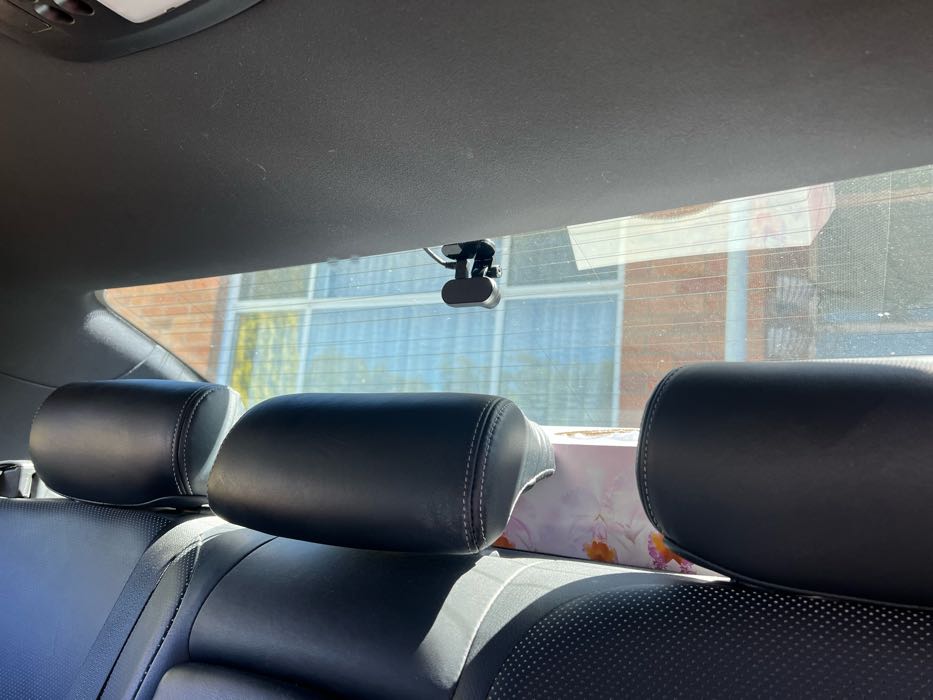
Mounting matters. The best place to put rear dash cam is centered on the rear windshield, just below or level with the rearview mirror line. This position gives the widest view, reduces glare, and keeps the camera out of sight from casual view.
Why center placement works:
- Even field of view across the car behind you for balanced footage.
- Easier to align the horizon and avoid tilted video.
- Lower chance of the camera pointing at a headrest or interior.
Alternate good spots:
- Near the top center of the glass if your car has a clear, uninterrupted area.
- Slightly off-center when a rear wiper, defroster lines, or a headrest blocks the center view.
I learned early on that off-center or low mounting gives skewed footage. Centering solved that and reduced the need to re-adjust. The best place to put rear dash cam is usually where you get clear, unobstructed glass and minimal reflection.

Factors to consider when choosing the best place to put rear dash cam
Think about vision, wiring, privacy, and law. These factors decide the final spot for the best place to put rear dash cam in your car.
Key things to check:
- Visibility: Avoid headrests and cargo. Make sure the whole road is visible.
- Glare and reflection: Keep the camera away from direct sunlight angles and interior lights.
- Power and wiring: Pick a route to the front camera or an easy power source.
- Legal limits: Some states or countries restrict windshield obstructions. Know local rules.
Practical tip: If your rear window has defroster lines, avoid placing the lens over heavy grid areas. I once mounted over a defogger and my footage had streaks. Moving the camera a few inches fixed it.

Step-by-step installation tips for the best place to put rear dash cam
Follow a simple plan. These steps help you mount the rear cam in the best place to put rear dash cam quickly and cleanly. ensuring you understand how dash cams mount securely will enhance your installation process. Use the provided mounting tools and read through the instructions carefully to find the optimal position for the camera. A secure mount not only provides stability but also ensures clear recordings without interruptions.
- Clean the area
- Use glass cleaner and a microfiber cloth.
- Let the glass dry fully before mounting.
- Test the view
- Power the camera temporarily.
- Check footage on a phone or display while sitting in the driver seat.
- Mark the spot
- Use a small piece of painter’s tape to mark the center spot.
- Re-check alignment from inside and outside.
- Route the cable
- Tuck it along trim or under headliner.
- Avoid sharp bends and heater vents that could overheat the wire.
- Final mount and secure
- Use the provided adhesive or a suction mount if needed.
- Press firmly and allow adhesive to set per instructions.
I always run a test drive after installation. That shows road vibration, glare in different light, and whether the camera keeps its angle. This hands-on approach nails down the best place to put rear dash cam for reliable evidence.

Choosing mounts, lenses, and angles for the best place to put rear dash cam
A good mount and lens make the spot matter less. But pick them carefully to get the best place to put rear dash cam.
Mount types to consider:
- Adhesive mount for a steady, permanent fit.
- Suction mount for temporary use or testing positions.
- 3M double-sided tape for thin glass and low-profile installs.
Lens and angle tips:
- Choose a wide-angle lens (120–165 degrees) for good coverage.
- Tilt slightly downward to reduce sky glare and focus on number plates.
- Avoid extreme wide angles that distort distant objects.
If you want license plates readable, aim for a narrower field or higher resolution sensor. My rule: test with real footage at night and day. That reveals whether your chosen spot and lens capture useful details.

Common mistakes to avoid when choosing the best place to put rear dash cam
Save time by skipping these traps I’ve seen often. They ruin footage or lead to re-installation.
Common errors:
- Mounting too low behind the trunk lip or cargo, which blocks view.
- Placing over defroster lines or wipers that cause streaks or obstructions.
- Running cables across the rear window where they snag or fray.
- Ignoring the sun angle for morning/evening glare.
A friend once placed a rear cam behind a baby seat headrest. The footage was useless until we remounted. Avoid that by checking both empty and loaded car conditions.

Legal, privacy, and safety considerations for the best place to put rear dash cam
Be mindful of laws and privacy. The best place to put rear dash cam also needs to respect local rules and passenger privacy.
Check these points:
- Windshield obstruction laws: Some areas limit items on glass. Keep the cam low-profile.
- Audio recording laws: Some regions require consent to record audio. Disable audio if unsure.
- Privacy of passengers: Avoid recording inside the cabin where possible.
I always advise checking local traffic rules before permanent installation. It’s better to be safe and avoid fines or disputes.

Maintenance and testing to keep the best place to put rear dash cam effective
Once mounted, maintain it. Regular checks help keep the camera working and positioned correctly.
Routine checks:
- Clean the lens monthly with lens safe cleaner.
- Inspect mount adhesive and wiring quarterly.
- Review saved footage to ensure image quality.
At times, thermal expansion weakens adhesive. I once had a camera fall after a heatwave. Replacing the adhesive fixed it and kept the camera at the best place to put rear dash cam.
Best practices for night and bad-weather recording at the best place to put rear dash cam
Night and rain test the camera and position. Small tweaks help the best place to put rear dash cam record useful evidence.
Best practices:
- Lower the exposure or enable night mode if your camera supports it.
- Angle slightly downward to catch tail lights and plates, not the sky.
- Use a camera with good low-light sensors or infrared support if you drive at night often.
I recommend a short night test drive after installation. It will show if glare or reflections spoil footage and if the camera position needs adjustment.
Frequently Asked Questions of best place to put rear dash cam
Is the center of the rear windshield always the best place to put rear dash cam?
Center is usually best because it gives the widest and most balanced view. Exceptions exist when obstructions like headrests or defoggers block the center.
Will mounting near the rearview mirror block my view?
Mounted low and centered, the rear cam should not block your view. Follow local windshield-obstruction rules and keep it compact and close to the glass.
Can I hide the rear dash cam from plain sight?
Yes. Place it low on the glass and use a slim mount to keep it discreet. Tinted glass and small housings also help reduce visibility.
How do I run power to a rear dash cam safely?
Route the cable along trim or headliner and secure it with clips. For a clean job, hardwire to a fuse box or use a rear USB power source if available.
Will rain or condensation affect rear dash cam footage?
Water droplets and condensation can blur footage. Keep the lens away from wiper sweep and use hydrophobic treatments or ensure proper camera tilt to shed water.
Conclusion
Choosing the best place to put rear dash cam comes down to a few clear rules: center the camera, avoid obstructions, mind glare, and secure wiring. Test in real conditions, and adjust the angle for readable plates and stable horizons. Try a short drive right after installation to confirm everything works as expected.
Take action today: find the central, clear spot on your rear glass, test the view, and mount with care. If you found this helpful, leave a comment, share your setup, or subscribe for more hands-on tips.

