

Most dash cams keep footage from a few hours to several weeks, depending on settings and storage.
I’ve spent years testing dash cams and helping people clear up footage questions. If you’ve ever wondered how long does dash cam store footage, this guide walks you through real-world retention times, the tech behind storage, and practical steps to keep the clips you need. I’ll share clear examples from devices I’ve used, plus simple tips to extend or secure footage when it matters most.

How dash cams store footage
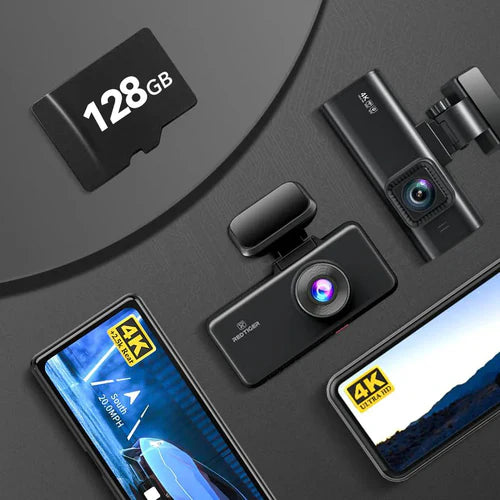
Dash cams record video to internal or removable storage. Most use microSD cards. Some models back up clips to internal flash or the cloud. File systems and video codecs determine how much space each minute of footage uses. Understanding dash cam storage requirements by resolution is essential for selecting the right model for your needs. Higher resolutions, such as 4K, require significantly more storage space compared to 1080p options, which means investing in larger capacity microSD cards or considering cloud storage solutions for long-term archiving. Additionally, users should keep in mind that file sizes can vary based on the type of footage and the compression algorithms used, affecting how much can be stored on the chosen media.
Video is saved in short clips. Many cams record in 1, 3, or 5 minute files. Once storage fills, the camera overwrites the oldest files unless you lock them. This behavior answers the core question of how long does dash cam store footage: it depends on available space, clip length, and overwrite rules.
Key factors that affect how long does dash cam store footage
There are a few big factors that change retention time. Knowing them helps you estimate how long your camera will keep footage.
- Storage capacity
- Larger microSD cards hold more video. A 32 GB card stores far less than a 256 GB card.
- Video resolution and bitrate
- Higher resolution and bitrate use more space. 4K footage fills cards much faster than 1080p.
- Loop recording settings
- Short clips overwrite older ones on a loop. The loop length affects how far back you can go.
- Parking mode and motion detection
- Parking mode can add many clips while parked, reducing normal loop time.
- Locked or incident files
- Auto-lock or manual lock prevents overwrite of important clips, extending their lifetime.
I’ve seen the same camera store one weekend of 4K footage on a 64 GB card and several weeks of 720p on a 128 GB card. So the settings matter more than brand.
Typical retention examples and quick math
Use simple math to estimate how long your camera keeps footage. Here are practical examples based on common settings.
- 1080p at 16 Mbps on a 64 GB card
- Roughly 10 hours of footage.
- 720p at 5 Mbps on a 64 GB card
- Roughly 30 hours of footage.
- 4K at 32 Mbps on a 128 GB card
- Roughly 8–10 hours of footage.
To calculate your own estimate:
- Find the camera’s bitrate (Mbps).
- Convert card size to megabits (GB × 8,192).
- Divide card megabits by bitrate.
- That gives total seconds, then convert to hours.
This is a practical way to answer how long does dash cam store footage for your exact setup.

Loop recording and how overwrite works
Loop recording is standard. Cameras write continuous clips and then delete the oldest when space is low. Most cams will not overwrite locked or incident files.
Key points:
- Regular clips get overwritten in order.
- Emergency files triggered by collisions get protected.
- Manual locking prevents overwrite until you unlock or transfer the file.
From my experience, relying only on loop recording is risky if you need specific long-term evidence. Always secure important clips promptly.

Extending footage retention: practical tips
If you need the camera to store footage longer, try these actions.
- Use a larger, high-end microSD card
- Cards rated for continuous video (A1/A2, V30+) last longer.
- Lower resolution or bitrate for longer retention
- Switch to 1080p from 4K if you need more hours of recording.
- Increase clip length when possible
- Fewer small files mean slightly less overhead and simpler file management.
- Enable parking mode only when needed
- Parking mode fills space fast. Turn it on selectively.
- Use cloud backup or Wi‑Fi transfer
- Some cameras upload clips automatically when in range.
- Regularly offload footage
- Set a schedule to copy important clips to a phone, laptop, or external drive.
I once preserved a hit-and-run clip by automatically uploading locked clips to the cloud. That backup saved me when my card later failed.

Legal and privacy considerations when storing footage
Keeping video has responsibilities. Laws vary by place. Be mindful of privacy and evidence rules.
- Know local laws about recording in public and private spaces.
- Avoid sharing sensitive footage without consent.
- Understand data retention rules if you use cloud services.
I always recommend encrypting backups and deleting clips you don’t need. That reduces risk and respects privacy.

How to retrieve and secure important clips
Finding and saving the right clip matters. Here are steps I use.
- Pause loop recording if possible to avoid overwriting.
- Lock the clip on the camera or app right away.
- Transfer the file to a phone or computer via Wi‑Fi or card reader.
- Make at least two backups: one local and one cloud or external drive.
When I did accident documentation for an insurance claim, quick locking and a phone backup made the process smooth. Waiting too long can mean the clip is gone.

Common mistakes and practical lessons learned
I’ve tested many setups and seen the same issues again and again. Avoid these mistakes.
- Using cheap cards that corrupt under constant writes
- Not locking important clips immediately
- Leaving parking mode on 24/7 with a small card
- Assuming cloud upload is instant or infallible
Fix these and you’ll get predictable answers to how long does dash cam store footage on your camera.

Frequently Asked Questions of how long does dash cam store footage
How long does a dash cam usually keep footage before it overwrites?
Most dash cams overwrite oldest footage once the card is full. This can be hours to weeks depending on card size and resolution.
Will a locked or incident file ever get overwritten?
No. Most cameras prevent locked or incident files from being overwritten until you manually delete them.
How much footage does a 128 GB card store on a 1080p camera?
A 128 GB card typically stores about 20–40 hours of 1080p footage, depending on bitrate and compression. if you’re considering dash cam storage recommendations for driving, it’s essential to evaluate both the duration of your trips and the clarity of the footage you desire. Higher resolution settings will require more storage, so investing in a larger capacity card or utilizing cloud storage options can be beneficial. Always choose cards that are specifically designed for continuous writing to ensure reliable performance during your journeys.
Does parking mode reduce how long footage is stored?
Yes. Parking mode records more events while parked and can fill the card faster, reducing overall retention time.
Can cloud backup extend how long dash cam store footage?
Yes. Cloud backup can keep important clips indefinitely, but it depends on your camera’s features and internet access.
Conclusion
You now know the main factors behind how long does dash cam store footage and how to control that timeline. Pick the right card, tweak resolution and parking mode, and lock or back up key clips quickly. Start by checking your camera’s bitrate and testing a card size to see real retention for your needs. If this guide helped, try backing up an important clip today, subscribe for more tips, or leave a comment about your dash cam setup. dash cam retention policies explained can help you understand how your device manages and stores footage over time. By tailoring these policies, you can optimize your dash cam’s performance to ensure critical moments are preserved for when you need them most. Familiarizing yourself with these guidelines will also empower you to make informed decisions about future upgrades and settings.

