


Look for a small camera near the rearview mirror or check your car for a recording device.
I’ve checked dozens of cars and spent years testing in-car cameras, so I know the signs that tell you how do you know if you have a dash cam. Read on for clear, step-by-step checks, real tips from my experience, and how to confirm if your vehicle is recording.
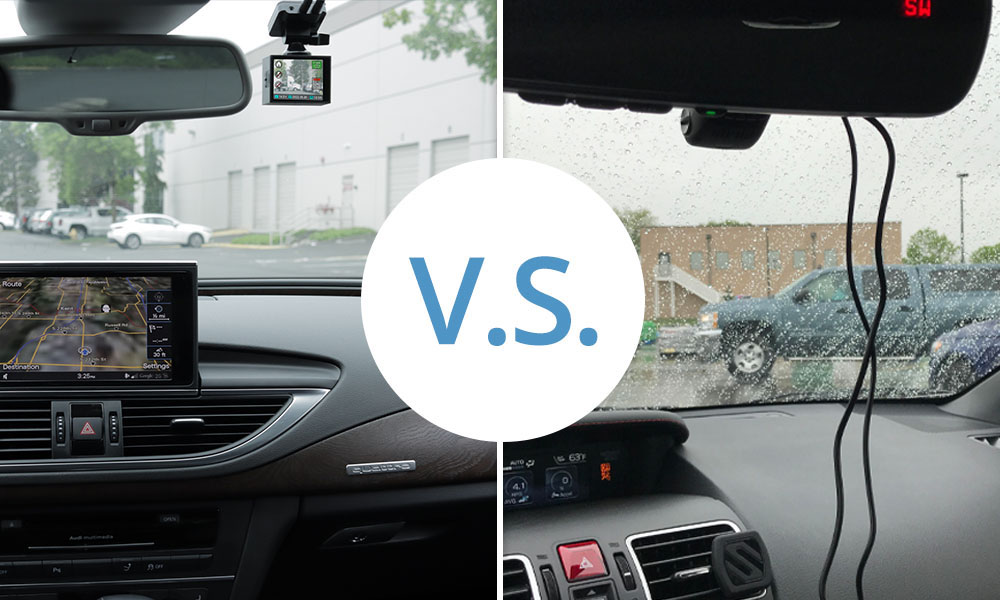
How to visually inspect your car for a dash cam
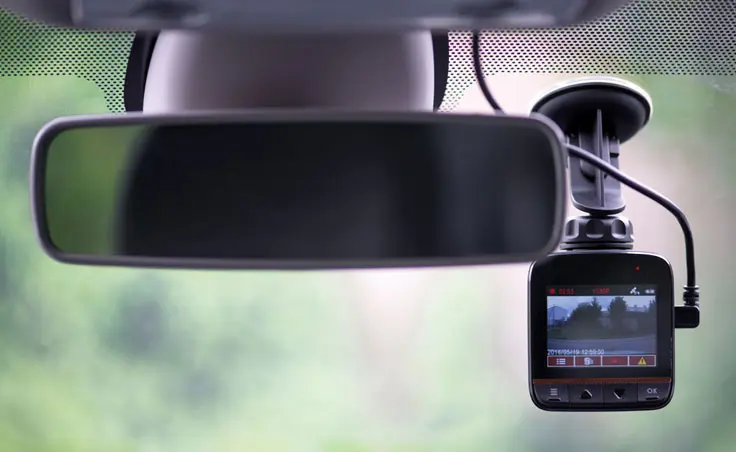
Start with a plain look at the windshield and the rear window. Many dash cams sit behind the rearview mirror. They are often small, black, and boxy. If you see a tiny lens or a small device mounted to the glass, that is likely a dash cam and answers how do you know if you have a dash cam.
Check the dashboard and vents too. Some models stick to the dash with adhesive. Others use a suction mount. These mounts are obvious once you look closely.
Look inside the cabin at night. A faint LED glow can show a camera’s power status. If the camera faces the road, it usually records forward. If it faces inside, it may be a cabin or dual-facing dash cam.

Check your infotainment, apps, and settings
Modern cars link to apps and screens. Open your car’s infotainment settings and look for camera or recording options. Some dash cams stream to a phone app. If you see a paired camera device, you likely have a dash cam.
Check Bluetooth and Wi-Fi device lists on your phone. Dash cams often show up as a local Wi-Fi network or paired device name. This method is a quick way to confirm how do you know if you have a dash cam without opening panels.
If you find an app, open it to view live feed or saved clips. That will tell you if a camera is active and how it stores footage.

Look for storage, wiring, and power clues
Follow cables from the windshield toward the fuse box or cigarette lighter. Dash cam wiring often runs along the headliner and A-pillar. If you see a microSD card slot on the device or card in the glove box, that is a storage clue.
Check the cigarette lighter or 12V socket for a camera USB plug. Some dash cams hardwire to the car’s fuse box. If a fuse box has a dash cam adapter or a continuous power module, you likely have a dash cam installed.
Open the dome light or trunk if a rear camera is present. Rear dash cams have wiring routed through the car interior. Finding that cable is a clear sign.
Signs your car is actively recording
An LED that blinks or stays lit while the car is on usually means recording. Some dash cams beep when they start or stop. If your phone connects and you can view live video, the camera is live.
Look for saved files on a microSD card. Clips labeled by date and time mean recording is happening. Also check for motion or impact event folders—these hold clips saved from crashes or motion while parked.
If the camera reacts to shaking or sudden power loss by saving a clip, that proves active recording. These behaviors show how do you know if you have a dash cam recording right now.

Types of dash cams and where they hide
There are a few common types. Each hides in different spots.
Single-lens dash cam
Often mounted behind the rearview mirror. Records forward view only.Dual-lens dash cam
Has front and cabin or rear lenses. Cabin lenses sit near the mirror, rear lenses hide near the rear window.Hardwired dash cam
Wires into the fuse box and tucks behind panels. These are less obvious.Battery or USB-powered dash cam
Plugs into the 12V socket. Easier to spot because of visible cables.Mirror dash cam
Looks like a rearview mirror replacement. It blends in and answers a common question about how do you know if you have a dash cam when it looks like a normal mirror.
Knowing the type helps you know where to look and how to confirm the device.
How to confirm with tech: accessing files and playback
Remove the microSD card and check it on a computer. Look for video files named by date and time. Play a clip to see what the camera captured.
Connect to the camera’s Wi-Fi if available. Use the app to view live feed and settings. This is the fastest way to confirm how do you know if you have a dash cam and to learn its make and model.
If the device is hardwired and sealed, use a trim tool to inspect behind panels or ask a trusted shop to help. A professional can trace wiring safely and confirm the camera type and power source.
Legal and privacy considerations when you discover a dash cam
Laws vary by state and country about recording inside cars and in public. Many places allow front-facing recording on public roads. Recording passengers inside a vehicle may have extra rules. If you find a dash cam, know the local rules before sharing footage.
If someone else installed the camera in a shared vehicle, discuss privacy and consent. Remove or disable the device only after addressing legal and personal concerns.
If you plan to use a dash cam, label it or tell passengers. Clear communication avoids surprises and builds trust.
Installing, removing, and maintaining a dash cam: quick tips
If you plan to install, choose a clear view and keep the camera low on the windshield. Hardwiring can be neat but use a pro if you are unsure. Use a good microSD card from a trusted brand and format it in the camera.
For removal, gently disconnect power and trace wiring back to the fuse or power source. Tuck cables back so they do not interfere with airbags. Regularly check recordings and clean the lens for clear footage.
Knowing basic care helps you keep the camera ready and answers the question of how do you know if you have a dash cam that works when you need it.

Frequently Asked Questions of how do you know if you have a dash cam
How can I quickly tell if my car has a dash cam?
Look behind the rearview mirror and along the windshield for a small lens or black box. Check for a cable that runs to a power source or a microSD card slot.
Can I find a dash cam through my phone’s Wi-Fi list?
Yes. Many dash cams create a local Wi-Fi network. If you see a camera network name, connect with the camera app to confirm.
Is a dash cam visible at night?
Sometimes. Many dash cams have a faint LED or a small glow when powered. If you see a light near the mirror, it may be a camera.
What if the camera is hardwired and hidden?
Trace the wiring from the windshield to the fuse box or ask a professional to inspect. Hardwiring hides cables inside trim panels but leaves power clues at the fuse box.
Will a dash cam save video if I remove the microSD card?
If you remove the microSD card, the camera cannot save new clips, but existing files remain on the card. Always power off the camera before removing the card to avoid file corruption.
Conclusion
Finding a dash cam is usually simple if you know what to look for: a small lens, a cable, an SD card, or a Wi-Fi network are the main clues. Use the steps above to inspect visually, check apps, and confirm recordings with playback. Take a careful, calm approach and respect privacy and local laws when you discover or use a dash cam.
Try the quick checks today—look at the windshield, scan device lists on your phone, and pull the microSD card if one is present. If you learned something useful, subscribe, leave a comment, or share your dash cam story.

