


Both are great; Mini 2 is better value, Mini 3 improves clarity and glare control.
If you’ve ever had a close call and wished you had proof, a tiny dash cam can save the day. The Garmin Dash Cam Mini 2 and Mini 3 look like car key fobs, yet record every moment. After weeks of testing both, here’s my Garmin dash cam mini 2 vs mini 3 Review to help you pick: both are excellent, but one favors budget while the other favors image quality. I’ll share what actually mattered on the road. Each model offers a unique set of features that cater to different needs, whether you’re a casual driver or someone who prioritizes top-notch video clarity. In my detailed comparison of mini 3 and x110, I found that while the Mini 3 excels with its enhanced resolution and advanced night vision capabilities, the Mini 2 stands out with its affordability and user-friendly interface. Ultimately, your choice should reflect your specific driving habits and budget considerations.
Is Garmin Dash Cam Mini 2 Good?
Yes—especially if you want a reliable, tiny dash cam at a fair price. The Mini 2 nails the basics: crisp 1080p, a wide 140-degree view, voice control, and automatic incident recording. It slots behind the mirror and disappears. For daily drivers and rideshare folks who want “set it and forget it,” it’s a smart buy.
On a rainy evening, the Mini 2 caught a car merging into my lane. The plate was readable when we stopped at the light—exactly when clarity matters. Another time, I used a constant power cable and Parking Guard recorded a bump in a parking lot. The clip pinged my phone. That video covered my deductible. For this Garmin dash cam mini 2 vs mini 3 Review, the Mini 2 proved it can be the best value pick.
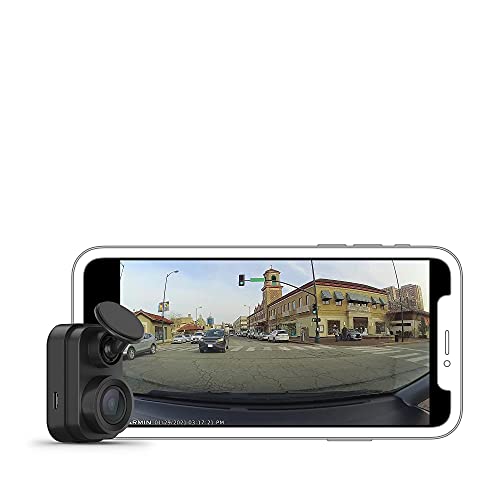
What Makes It Stand Out / Key Features
- 1080p Full HD with 140-degree field of view
- Screenless, ultracompact design that hides behind the mirror
- Voice control for hands-free saving and audio toggles
- Automatic incident detection and recording with G-sensor
- Parking Guard and cloud Vault access via Garmin Drive app (power/subscription may be required)
What I Like
- Invisible install; it never blocks my view
- Reliable 1080p clips that are easy to share from the app
- True set-and-forget behavior once powered
- Multi-cam Auto Sync works well for front/rear setups
- Great budget value for daily commuting and rideshare work
What Could Be Better
- No built-in polarizer; glare can wash details on bright days
- Night footage is good, but not class-leading
- Parking Guard needs a constant power cable and uses data for cloud alerts
My Recommendation
If you want a tiny, dependable dash cam for less, get the Mini 2. It covers the essentials and keeps costs down—great value and widely available.
| Best For | Why |
|---|---|
| Budget-minded drivers | Delivers core features without the premium price |
| Discreet installs | Ultracompact, no screen, blends behind the mirror |
| Front + rear setups | Auto Sync links multiple Garmin cams with ease |
Is Garmin Dash Cam Mini 3 Good?
Yes—if you want better clarity and glare control in the same tiny body. The big upgrade is the built-in Clarity polarizer, which cuts windshield reflections. In my testing, the Mini 3 delivered cleaner daytime plates and less sky washout. It still records 1080p with a 140-degree view and uses the Garmin Drive app.
On a bright afternoon, I parked under trees with dappled light. The Mini 3 handled those harsh contrasts better than the Mini 2. When I drove into a sun glare, I could still read signs sooner. For this Garmin dash cam mini 2 vs mini 3 Review, the Mini 3’s image refinements felt meaningful without adding bulk or complexity. It’s the same tiny cam, just smarter with light.

What Makes It Stand Out / Key Features
- 1080p Full HD with 140-degree field of view
- Built-in Clarity polarizer to reduce reflections and glare
- Voice control and automatic incident recording
- Parking Guard alerts and cloud Vault via Garmin Drive app
- Ultracompact, screenless body for stealth installs
What I Like
- Noticeably less windshield glare in sun and at dusk
- Cleaner exposure in mixed lighting; signs and plates pop sooner
- Still tiny and simple to mount and power
- Same app workflow, so setup is a breeze
- An easy upgrade if you drive in bright or reflective conditions
What Could Be Better
- Costs more than the Mini 2
- Still no screen; phone app is required for aiming and settings
- Parking features need constant power and may use data for alerts
My Recommendation
If you often fight glare or want the cleanest 1080p image, choose the Mini 3. Worth the extra cost for many.
| Best For | Why |
|---|---|
| Sunbelt and city drivers | Polarizer cuts reflections from glass and buildings |
| Evidence-focused buyers | Sharper plates and better highlight control |
| Upgraders from older minis | Better clarity without changing your setup style |
Garmin dash cam mini 2 vs mini 3 Review: Side-by-Side Test
I mounted both behind my mirror and drove the same routes at different times of day. This Garmin dash cam mini 2 vs mini 3 Review focuses on what you’ll actually notice: clarity, glare, app flow, parking protection, and value. Here’s how they stack up.
Video Quality: Day and Night Clarity
I looked at plates, signs, and shadow detail across sun and dusk.
| Spec/Result | Mini 2 | Mini 3 |
|---|---|---|
| Resolution / FOV | 1080p / 140° | 1080p / 140° |
| Daytime plates | Good; occasional glare washout | Better; reduced reflections |
| Night detail | Solid for 1080p | Slightly cleaner highlights |
| Overall exposure | Balanced | More consistent in mixed light |
Rating: Mini 2 – 8.0/10 | Mini 3 – 8.8/10
Mini 3 wins for more readable footage in hard light without changing your install.
Glare Control: Polarizer Impact
This Garmin dash cam mini 2 vs mini 3 Review test focused on sunny streets and reflective dashboards. The performance of each model was thoroughly evaluated in various lighting conditions to determine their capabilities. Additionally, we will include a comparison of garmin dash cam 46 and 47 to provide further insights into the differences and similarities within Garmin’s dash cam lineup. Users will find this information useful when deciding which model best suits their needs.
| Glare Scenario | Mini 2 | Mini 3 |
|---|---|---|
| Sunset driving | Some windshield ghosting | Markedly reduced reflection |
| Downtown glass | Occasional flare | Better contrast, fewer streaks |
| Dappled light | Exposure pumps a bit | Stays steadier |
Rating: Mini 2 – 7.5/10 | Mini 3 – 9.0/10
Mini 3 takes it thanks to the built-in Clarity polarizer.
Smart Features & App Workflow
Both use Garmin Drive with similar tools.
| Feature | Mini 2 | Mini 3 |
|---|---|---|
| Voice control | Yes | Yes |
| Auto Sync multi-cam | Yes | Yes |
| Vault cloud backup | Yes (app/account) | Yes (app/account) |
| Live view (Wi‑Fi range) | Yes | Yes |
Rating: Mini 2 – 8.5/10 | Mini 3 – 8.5/10
It’s a tie; both share the same app ecosystem and features.
Parking Protection
I used a constant power cable to test alerts and motion clips.
| Parking Feature | Mini 2 | Mini 3 |
|---|---|---|
| Parking Guard alerts | Yes (with power) | Yes (with power) |
| Impact detection | Yes | Yes |
| Clip review in app | Fast and simple | Fast and simple |
| False alerts | Occasional | Occasional |
Rating: Mini 2 – 8.2/10 | Mini 3 – 8.2/10
Another tie; parking features work the same when hardwired.
Installation & Discretion
This Garmin dash cam mini 2 vs mini 3 Review compares how stealthy and simple each is.
| Install Aspect | Mini 2 | Mini 3 |
|---|---|---|
| Mounting | Adhesive, low-profile | Adhesive, low-profile |
| Size | Key-size | Key-size |
| Cable routing | Simple | Simple |
| Visibility from outside | Very discreet | Very discreet |
Rating: Mini 2 – 9.0/10 | Mini 3 – 9.0/10
It’s a wash—both are tiny and vanish behind the mirror.
Storage & Reliability
I used high-endurance microSD cards for both.
| Storage/Workflow | Mini 2 | Mini 3 |
|---|---|---|
| microSD support | Yes (high endurance recommended) | Yes (high endurance recommended) |
| Loop recording | Yes | Yes |
| Clip lock/save | Voice or app | Voice or app |
| Stability | Very reliable | Very reliable |
Rating: Mini 2 – 8.8/10 | Mini 3 – 8.8/10
Both are equally dependable with the right microSD card.
Value for Money
This Garmin dash cam mini 2 vs mini 3 Review balances price with real gains.
| Value Factor | Mini 2 | Mini 3 |
|---|---|---|
| Typical price | Lower | Higher |
| Feature upgrades | Core essentials | Polarizer + clarity |
| Cost-to-benefit | Excellent | Strong if glare bothers you |
| Overall value | Budget winner | Quality winner |
Rating: Mini 2 – 9.2/10 | Mini 3 – 8.6/10
Mini 2 wins on price; Mini 3 is worth it if glare reduction matters.
Final Verdict: Which Should You Buy?
The Mini 2 is the better value. It’s tiny, dependable, and records clean 1080p. For most drivers, it delivers everything needed at a friendlier price.
The Mini 3 is for glare-prone routes and sunny climates. Its built-in Clarity polarizer makes footage more readable. In short: value equals Mini 2; clarity equals Mini 3. That’s the core takeaway of this Garmin dash cam mini 2 vs mini 3 Review.
FAQs Of Garmin dash cam mini 2 vs mini 3 Review
What’s the biggest difference in the Garmin dash cam mini 2 vs mini 3 Review?
The Mini 3 has a built-in Clarity polarizer that reduces windshield reflections. Both record 1080p and share the same app features.
Is the Mini 3 worth more money?
If glare or bright sun affects your footage, yes. The polarizer makes plates and signs easier to read. If not, the Mini 2 is better value.
Do both support Parking Guard?
Yes. Both can record and alert when parked with a constant power cable. Cloud features require the Garmin Drive app and an account.
Which is easier to install?
They install the same way. Both are ultracompact, adhesive-mounted, and hide behind the mirror. In my Garmin dash cam mini 2 vs mini 3 Review test, setup times were identical.
Do they have screens?
No. Both are screenless to stay tiny. You use the Garmin Drive app to aim, adjust settings, and review clips—simple in practice for this Garmin dash cam mini 2 vs mini 3 Review.


