


Run the dash cam cable behind trim, keep clear of airbag zones, and hardwire to an ignition fuse.
I’ve installed many dash cams and guided dozens of drivers on safe setups. This guide explains how to install dash cam on a car with airbag so you protect your vehicle, avoid disabling safety systems, and get clean, reliable power. Read on for a clear, step-by-step plan, safety tips, wiring options, and real-world lessons from my hands-on experience.

Why careful installation matters
Installing a dash cam near airbags needs care. Airbags deploy with force and can tear or block cables placed in their path. A wrong cable route can damage the airbag cover or change deployment dynamics. Knowing how to install dash cam on a car with airbag protects passengers and keeps the camera working.
I’ve seen trims torn and fuses blown from rushed installs. A neat, airbag-safe install keeps the car stock, preserves warranty, and avoids safety hazards. Below I cover tools, steps, and mistakes to avoid.

Tools and parts you need
Gather these items before you start. Having the right tools avoids improvising near airbags.
- Dash cam and mount kit
- Hardwire kit with fuse tap (if hardwiring)
- Trim removal tool set
- Multimeter or test light
- Wire crimpers and electrical tape
- Micro-USB/USB-C or proprietary cable to camera
- Cable clips or adhesive wire holders
- Owner’s manual or fuse box diagram
When planning how to install dash cam on a car with airbag, read the car manual for airbag locations and side curtain routing. This saves time and keeps you safe.

Legal and safety considerations
Before you start, check laws and safety notes in your region. Some places restrict windshield devices or camera placement that blocks view.
- Avoid placing camera where it obstructs driver view.
- Do not pierce or modify airbag covers or seams.
- Use approved fuse taps and wiring. Improper wiring can create fire risk.
- If unsure, consult a professional installer or dealer.
Being careful with how to install dash cam on a car with airbag reduces liability and the risk of malfunctions.

Step-by-step: how to install dash cam on a car with airbag
Follow these short steps for a safe, clean install. I keep steps simple so anyone can follow.
Plan camera position
- Choose an area behind the rearview mirror or lower center. Keep it out of the airbag deployment zone.
- Confirm the mount won’t block sensors or view.
Test camera and power method
- Plug camera into cigarette lighter first to confirm function.
- Decide between accessory power (cigarette socket) or hardwire to fuse box. Hardwire gives cleaner look and parking mode.
Identify airbag zones
- Check the owner’s manual for SRS/AIRBAG labels on pillars and trim.
- Never route cables behind or across the seam of an airbag cover.
Route the cable safely
- Peel back the headliner or A-pillar trim using trim tools. Work gently.
- Run the cable along factory harnesses and behind the trim, not under the airbag cover seam.
- Use cable clips or tuck cables under rubber seals at the windshield edge.
Hardwire to fuse box (recommended for parking mode)
- Find an ignition-switched fuse for power and a constant fuse for parking mode if needed.
- Use a fuse tap and inline fuse. Connect the ground to a clean metal chassis point.
- Test voltages with a multimeter before finalizing connections.
Secure and hide cables
- Reinstall trim carefully, checking that cables are not pinched.
- Use adhesive clips to secure slack and keep cables out of moving parts.
Test camera operation
- Start the car and verify camera powers on with ignition if hardwired that way.
- Record a short video and check field of view. Adjust angle for road and plate capture.
Each of these steps shows exactly how to install dash cam on a car with airbag without risking safety systems. Take your time at the routing step — it’s the most important.

Hardwiring tips for airbag-safe installs
Hardwiring gives a neat, professional look. It also requires the most care near airbags.
- Use the correct fuse tap type for your vehicle.
- Choose a fuse that is ignition-switched for camera power, unless you want constant power for parking mode.
- Ground wire to an unpainted metal surface. Avoid bolts near airbags or electronic modules.
- Run power cables along existing wiring looms. This keeps wires in factory channels and away from SRS seams.
- If adding parking mode that draws current when off, use a low-current draw kit or voltage cutoff to avoid battery drain.
From my experience, using a fuse tap with a built-in LED tester saved time and kept wiring clean. I also label taps so future repairs are easier.

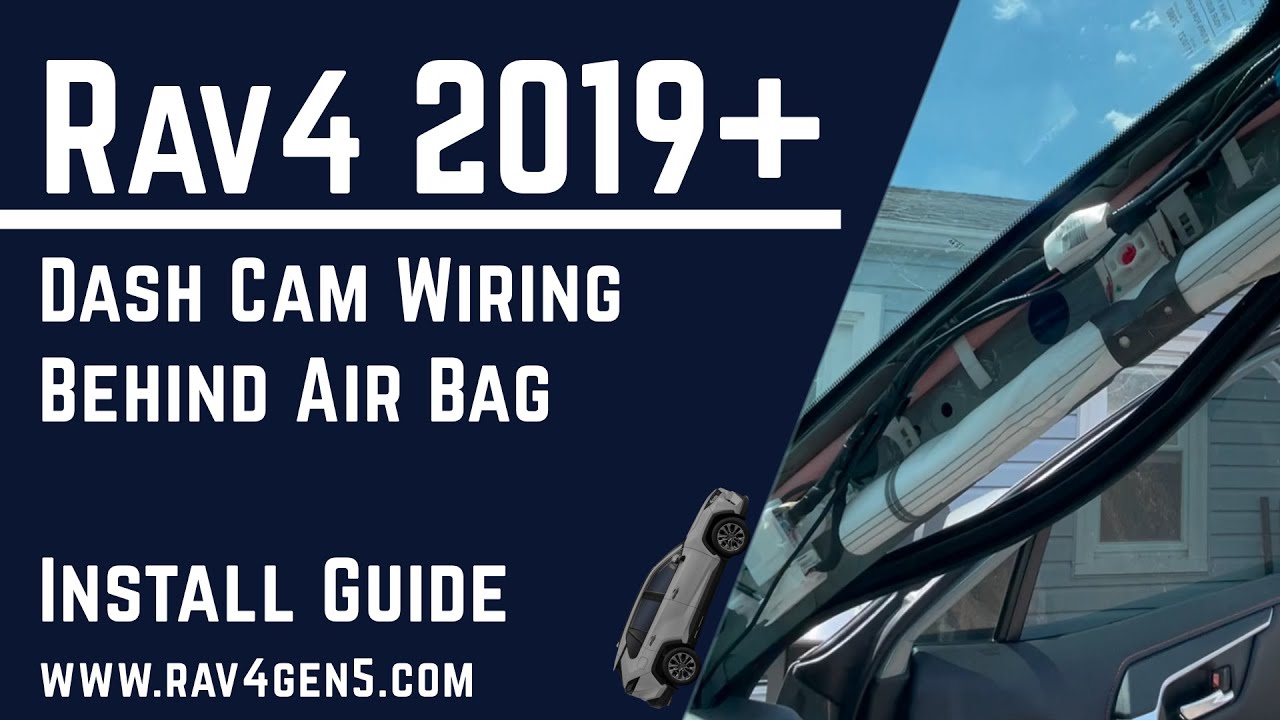
Routing the cable behind the A-pillar without touching airbags
The A-pillar often houses side curtain airbags. Here’s a safe way to route wires.
- Start at camera mount and tuck cable into windshield rubber trim.
- Use trim tools to loosen the A-pillar cover top and slide cable behind it.
- Keep cable routed alongside the pillar harness, away from the airbag cover seam.
- Re-clip the A-pillar and ensure the cover sits flush. Tug gently on cable to confirm no pinch.
A good rule: if you can see the cable under the airbag label or seam, reroute it. I once found a cable jammed under a seam; it popped out during a detail and was a clear hazard.

Troubleshooting and testing
Simple tests catch issues early.
- Camera won’t power on: check fuse tap, test with lighter socket, and verify ground.
- Camera restarts or flickers: loose ground or poor fuse choice. Try another fuse with steady power.
- Wires pinched by trim: remove trim and re-route if camera cuts out after reassembly.
Record at least two short drives to confirm stability. I always take a quick video after each install to verify angle and audio.
Maintenance and long-term tips
Keep your install tidy and reliable.
- Inspect the cable route every 6 months. Look for pinching or wear.
- Update camera firmware when available.
- Keep the lens clean for clear recordings.
- If you sell the car, leave documentation about the hardwire tap and fuse info.
A neat install lasts longer and avoids surprises. Knowing how to install dash cam on a car with airbag properly cuts down on future fixes.

Frequently Asked Questions of how to install dash cam on a car with airbag
Can I stick a dash cam on the windshield near the airbag?
Yes, you can mount it behind the rearview mirror but avoid placing adhesive over labeled airbag seams. Route the cable so it does not cross airbag covers.
Is it safe to hardwire a dash cam in a car with airbags?
Hardwiring is safe if you route wires outside airbag deployment zones and use proper fuse taps and grounding. Follow the car manual and use proper tools.
What fuse should I tap for power?
Tap an ignition-switched fuse for camera-on-with-ignition. For parking mode, use a constant fuse with a low-voltage cutoff. Test fuses with a multimeter first.
Will installing a dash cam void my warranty?
A neat, non-invasive install rarely voids warranty. Avoid cutting trim or altering airbag components to keep warranties intact. Keep records of the install.
Can dash cam wiring affect airbag deployment?
If wiring is routed incorrectly, it can interfere with deployment. Proper routing behind trim and away from airbag seams prevents this risk.
Conclusion
A safe and tidy dash cam install blends function with vehicle safety. Follow simple steps to plan placement, route cables outside airbag zones, and hardwire with proper fuse taps. Take your time, test voltages, and double-check that no cable crosses an airbag seam. Try the steps in this guide and you’ll have a reliable setup that protects both passengers and footage. If you found this useful, subscribe, share your install story, or leave a question below to get tailored advice. Additionally, it’s essential to familiarize yourself with the features of your dash cam to optimize its functionality. For those wondering how to set up apeman dash cam, consulting the user manual can provide valuable insights on settings and installation tips specific to the model. Ultimately, taking the time to ensure everything is properly configured will enhance your driving experience and ensure maximum protection on the road.

