


For most everyday drivers, a 2K dash cam balances clarity, file size, and cost better than 4K.
I’ve tested dash cams for years and helped drivers pick gear that holds up in real life. This guide compares 2k vs 4k dash cam performance, cost, and usefulness. I’ll break down how resolution affects video detail, night footage, storage, hardware, and real-world value. By the end, you’ll know which option fits your needs and budget. When evaluating dash cams, it’s also essential to consider features beyond resolution, such as field of view and ease of installation. If you’re leaning towards higher clarity and detail, exploring options like the best 4k mirror dash cams can provide additional benefits, especially for those who prioritize comprehensive visibility. Ultimately, making an informed choice will ensure that you have the right tools to capture critical moments on the road. Additionally, it’s important to consider how 720p dash cam features might compare if you’re looking for a budget-friendly option. While they typically provide sufficient clarity for basic needs, the advancements in 2k and 4k technology offer a noticeable difference in quality, especially in challenging driving conditions. This guide will also highlight scenarios where investing in higher resolution might be particularly beneficial.

Resolution and image quality: what the numbers really mean
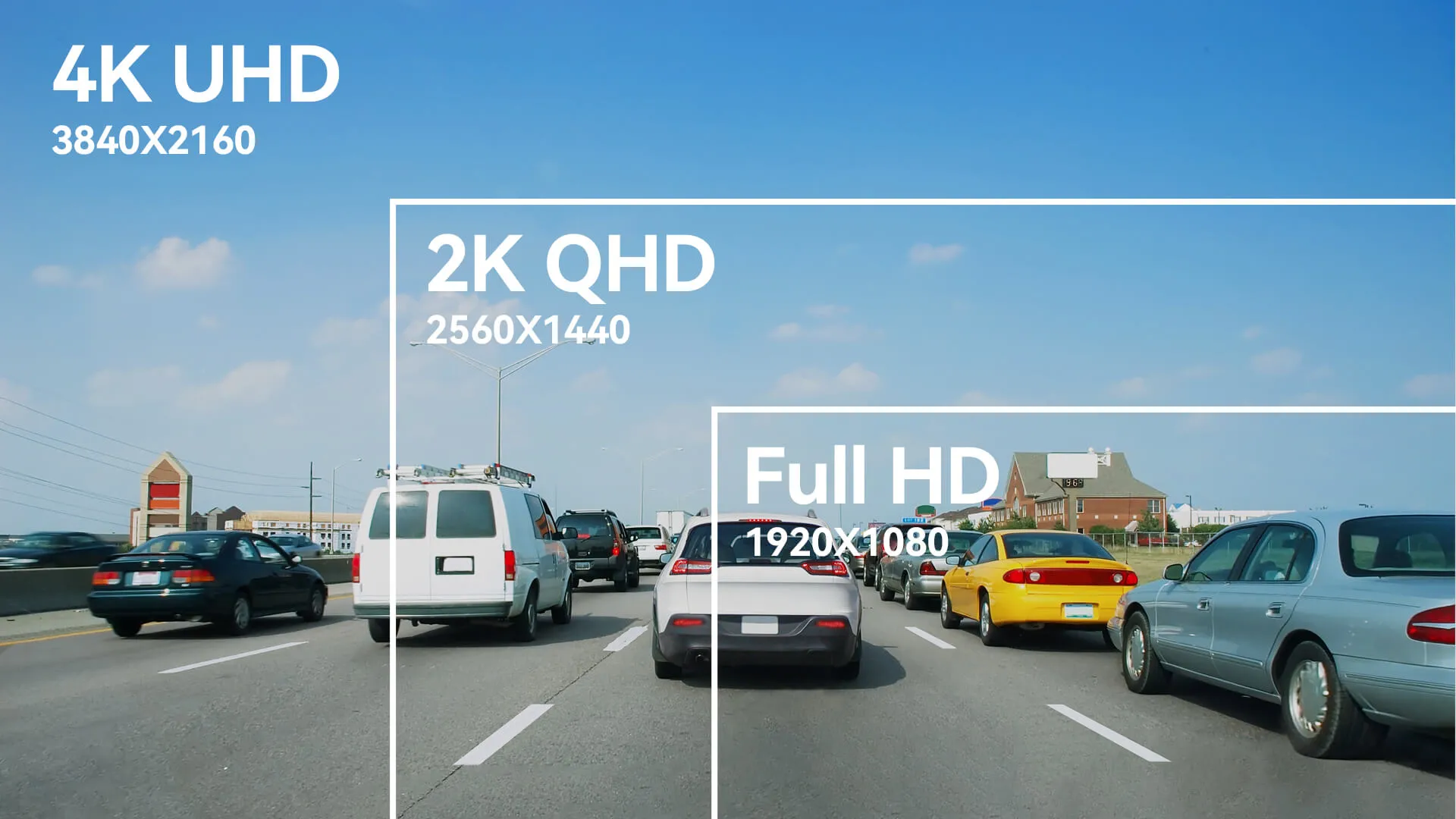
Resolution is the number of pixels a camera records. 2K typically refers to about 1440p. 4K is roughly 2160p. More pixels mean finer detail and clearer license plates at distance.
2K dash cam pros
- Smaller files that still show readable text in many conditions.
- Lower hardware demands for recording and playback.
- Better value per dollar for most drivers.
4K dash cam pros
- Greater detail for distant or small objects.
- Cleaner crop and zoom when reviewing footage.
- Future-proofing as displays and cloud services move to higher resolutions.
Practical note: If you drive in tight urban areas and need plate-level detail at longer range, 4K helps. For daily commuters and fleet vehicles, 2K often delivers the best balance of cost, storage, and clarity.
Check out: 2 Wire Vs 3 Wire Dash Cam Hardwire Kit: Which Is Better

Night and low-light performance: beyond pixel count
Resolution helps detail in daylight, but night performance depends on sensor size, lens aperture, and image processing. A large sensor with good low-light processing beats a tiny sensor, even at higher resolution.
Key factors that affect night footage
- Sensor size and pixel pitch influence light gathering.
- Aperture (f-number) determines how much light enters the lens.
- Noise reduction and HDR processing shape usable detail.
My experience: I’ve seen some 2K dash cams produce cleaner night video than cheaper 4K units. The 4K model looked sharper in daylight but became noisy at dusk. Choose a dash cam that balances sensor quality and processing, not resolution alone.

Storage and file size: practical implications of higher resolution
Higher resolution means larger files and more storage use. That affects microSD card needs, cloud uploads, and video transfer times.
What to expect
- 4K recordings can be 2–4 times larger than 2K at the same frame rate and bitrate.
- Longer loop record lengths need bigger cards or frequent offloads.
- High bitrates improve quality but increase size fast.
Tips from the field
- Use high-endurance microSD cards rated for dash cam use.
- Set smart bitrates or event-only high-quality recording if storage is limited.
- Consider a dual-channel setup where front is 4K and rear is 2K to save space.

Hardware, processing, and frame rates: the unseen limits
Resolution is one piece. Processor power, heat management, and firmware matter too. A weak chipset may struggle to record stable 4K at high frame rates.
Why this matters
- Dropped frames or overheating can corrupt footage.
- Higher frame rates (60 fps) help capture fast events but increase load.
- Stabilization, HDR, and WDR processing rely on capable hardware.
Real-world advice: I once tested a 4K dash cam that throttled after 10 minutes on hot days. It recorded at lower resolution to cope. That experience taught me to favor well-reviewed models with proven thermal design, not just resolution claims.
Practical use cases and recommendations
Match your choice to how you drive. Here are clear scenarios to guide you.
Choose 2K dash cam if you:
- Commute daily in city traffic.
- Want lower storage costs and easier file handling.
- Need solid value without premium price.
Choose 4K dash cam if you:
- Drive long rural roads and need distant detail.
- Frequently need plate-level evidence from farther away.
- Want future-proof footage for high-res playback and analysis.
Personal tip: For my family car, I use 2K for the front and 1080p for the rear. It covers everyday needs and keeps storage small. For a second vehicle that I use for long highway trips, I tested a 4K unit for clearer distant captures.

Installation, power, and legal considerations
Installation and how the cam is powered matter more than many buyers expect. Mount placement affects angle and reflections. Laws vary on windshield mounts and audio recording.
Practical points
- Place the camera near the rearview mirror to reduce glare.
- Use hardwiring kits for parking mode and constant power.
- Check local laws about audio recording and windshield obstructions.
Trust tip: Always secure firmware updates. They fix bugs that affect recording stability and legal compliance.

Cost, value, and longevity: what you’ll pay over time
Upfront price is only the start. Consider ongoing costs and how long the unit stays useful.
Cost factors
- Higher resolution dash cams often cost more initially.
- Higher storage needs mean larger and pricier microSD cards.
- Repairs, mounts, and battery/hardwiring add lifetime costs.
Value check: If a 4K dash cam costs twice as much but only rarely delivers clearer evidence for your use, that extra cost may not be worth it. Balance cost, expected benefits, and resale or upgrade cycles.

How to choose between 2k vs 4k dash cam: a quick checklist
Use this checklist to decide quickly.
Step-by-step decision guide
- Identify main need: distant detail or daily commuting.
- Check low-light reviews: sensor and aperture matter.
- Compare file sizes: calculate storage and cloud costs.
- Verify hardware stability: heat management and processor.
- Consider total cost: unit price plus cards and installation.
- Read real-user reviews about reliability and firmware support.
My final pick method: Prioritize night clarity and stable recording over raw pixel count. That approach saved me from buying flashy but unreliable units.
Frequently Asked Questions of 2k vs 4k dash cam
What is the main difference between a 2k vs 4k dash cam?
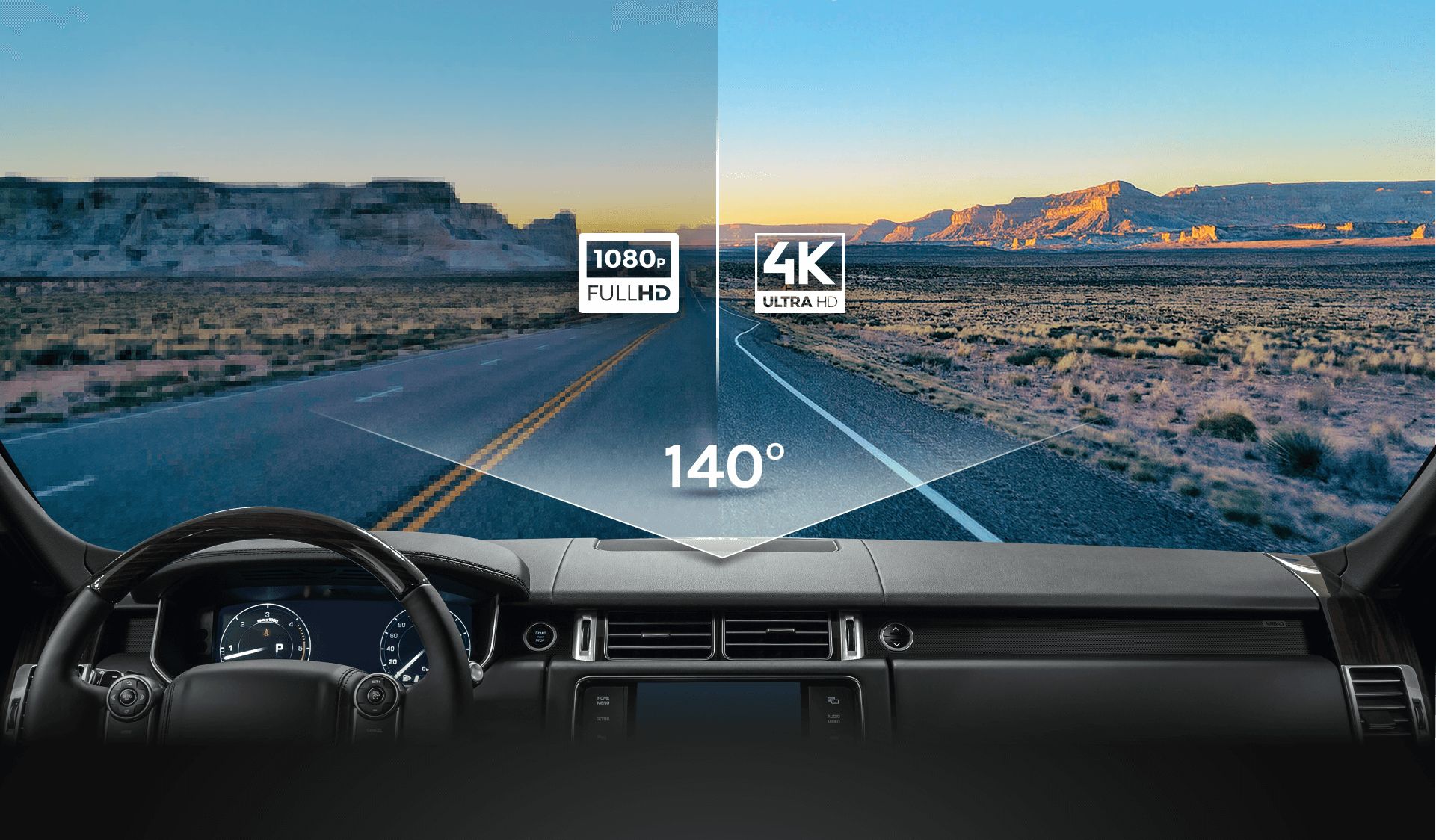
The main difference is pixel count and detail. 4K records more pixels and can show finer distant details, while 2K balances clarity with smaller file sizes and lower cost.
Read 2.5k vs 4k dash cam review
Will 4K always give better license plate reads than 2K?
Not always. Plate readability depends on distance, lens, frame rate, and low-light performance. A well-tuned 2K dash cam can often match a poor 4K unit in many conditions.
How much more storage does 4K use compared to 2K?
Roughly 2 to 4 times more at similar bitrates and frame rates. Exact sizes vary by codec, bitrate, and scene complexity.
Do I need a special microSD card for 4K dash cams?
Yes. Use high-endurance cards with high sustained write speeds rated for continuous video. Cheap cards may fail early or cause recording errors.
Is 4K worth it for everyday driving?
For most daily drivers, 2K is sufficient and more cost-effective. Choose 4K if you need distant detail frequently or want the highest possible image fidelity.
Also read: 2 wire vs 3 wire dash cam
Conclusion
Choosing between 2k vs 4k dash cam comes down to needs, not just numbers. 2K offers excellent balance for daily driving, low storage use, and better value. 4K shines when you need long-range detail and plan to handle larger files and higher costs. My recommendation: pick the resolution that matches how and where you drive, then focus on sensor quality, thermal design, and storage strategy.
Take action: evaluate where you drive most, compare night tests and file sizes, and pick a model with solid firmware support. If you found this helpful, leave a comment or share your dash cam experience so others can learn too.

